
Download Native Android Installer (.apk)
Official in-house Android distribution built for Concepcion Real Estate Marketing personnel, brokers, and staff. Works 100% offline with zero external dependencies.
f20a096a81d1fd1be5e107812e180ed6e8f83cc75b01cc380bf44870709332a5
Built Exactly for Office Request Workflows
1. Choice Cards: Budget vs. Urgent
Before filling out details, select between Budget Request Form (standard items/expenses) or Urgent Request Form. When Urgent is chosen, the document header dynamically updates to "Control / Urgent Request No." automatically.
2 Dedicated Form Modes2. "PRE-APPROVED" Bold Stamp
Under the Approved by section, tap the dedicated option to imprint a bold, large-font PRE-APPROVED authorization mark, bypassing lengthy manual sign-offs for pre-authorized disbursements.
One-Tap Fast Track Approval3. Touch Signature Pad with Clear & Delete
Tapping "Tap to sign" opens an interactive touch drawing canvas. Draw smoothly with finger or stylus. Features a dedicated Clear button to wipe and retry, and a Delete (X) button to cancel.
Vector Signature Capture4. Follows Official Form Layout
Replicates the exact layout of the Concepcion Real Estate Marketing physical form: Date, Department, Control No., Purpose, Table of Items with Qty, Unit, Particulars, and Amounts with automatic grand total calculation.
Pixel-Perfect Official Design5. High-Res PNG & PDF Export
Generate crisp high-resolution PNG image captures or print-ready PDF files with one tap. Send immediately through Messenger, Viber, WhatsApp, Gmail, or print directly via office wireless printers.
Instant PDF & PNG Delivery6. Standalone Android App (Not Chrome/PWA)
Compiled natively with Gradle and Android SDK Platform 34. Runs completely independent of Chrome or mobile web browsers. Fast boot time, full screen UI, and offline storage.
Zero Web Dependency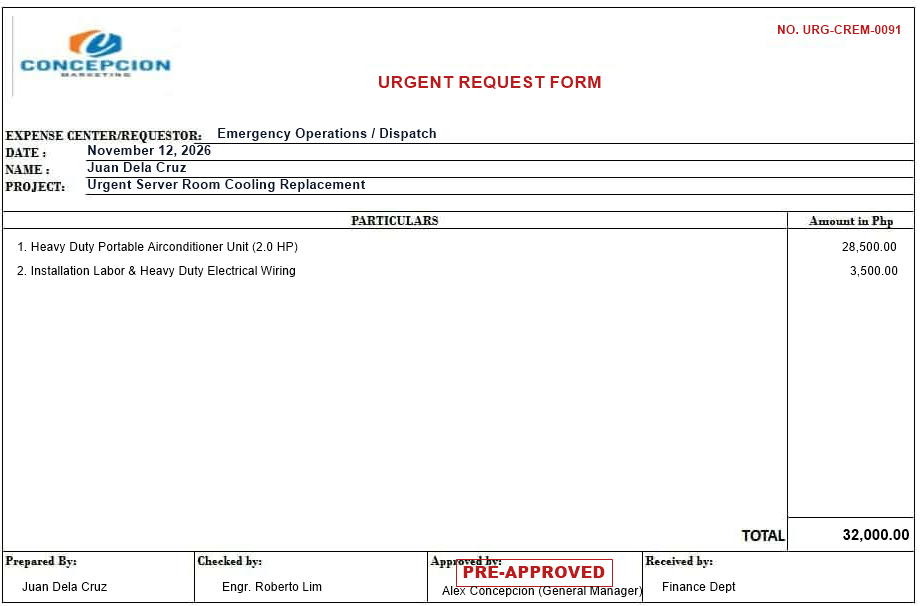
Real-time Generated Document
Here is an actual generated requisition produced by the Android app: complete with "Control / Urgent Request No." header, itemized particulars, computed PHP total, digital signature, and bold PRE-APPROVED authorization mark.
- ✓ Clean, smudge-free professional format for accounting
- ✓ Instant calculations eliminate arithmetic mistakes
- ✓ Digital signature popup replaces manual printing and pen-signing
- ✓ Eliminates tedious manual photo editing or scanning
Quick 4-Step Android Installation Guide
Because this is an internal proprietary tool distributed directly from the company VPS, follow these standard steps to install on any Android phone:
Download APK
Tap the Download BudgetRequestForm.apk button above or scan the QR code with your mobile camera.
Open File
Once downloaded, pull down your notification tray and tap on BudgetRequestForm.apk (or find it in your phone's Files / Downloads folder).
Allow Source
If Android displays "File might be harmful" or "Install unknown apps", tap Settings → Turn on "Allow from this source".
Install & Launch
Tap Install. Once completed, tap Open to start generating your Budget & Urgent Request forms immediately!